Here's How it Works
- You'll enroll in the program through your Smarthub account.
Mobile
- Login to Smarthub
- Click the ... in the bottom right
- Select Contact Us
- Select Account & Service Support
- Select Lighten the Load Signup
- Select today's date for the Required By Date field
- Click Send in the top right
Desktop
- Login to Smarthub
- Select Account & Service Support In the menu to the left
- Select Lighten the Load Signup from the dropdown
- Select today's date for the Required By Date field
- Click Send in the bottom right
- If you have trouble with this enrollment, please call 970-247-5786 and one of our Member Service Representatives can help you.
- You must ALSO enroll in email and/or text notifications in SmartHub to participate in our Lighten the Load program.
Mobile
- Login to Smarthub
- Select the ... in the bottom right
- Select Settings
- Select Contact Methods
- Confirm the phone and/or email address where you'd like to receive notifications is listed. If not, you'll need to add it via the phone or email icons at the top of the screen.
- Once added, click Settings in the top left to go back.
- Select Manage Notifications
- Select Usage
- Select Peak Time Alert
- Toggle the contact methods where you' dlike to receive notifications and click Save.
Desktop
- Login to Smarthub
- Click Settings in the menu to the left
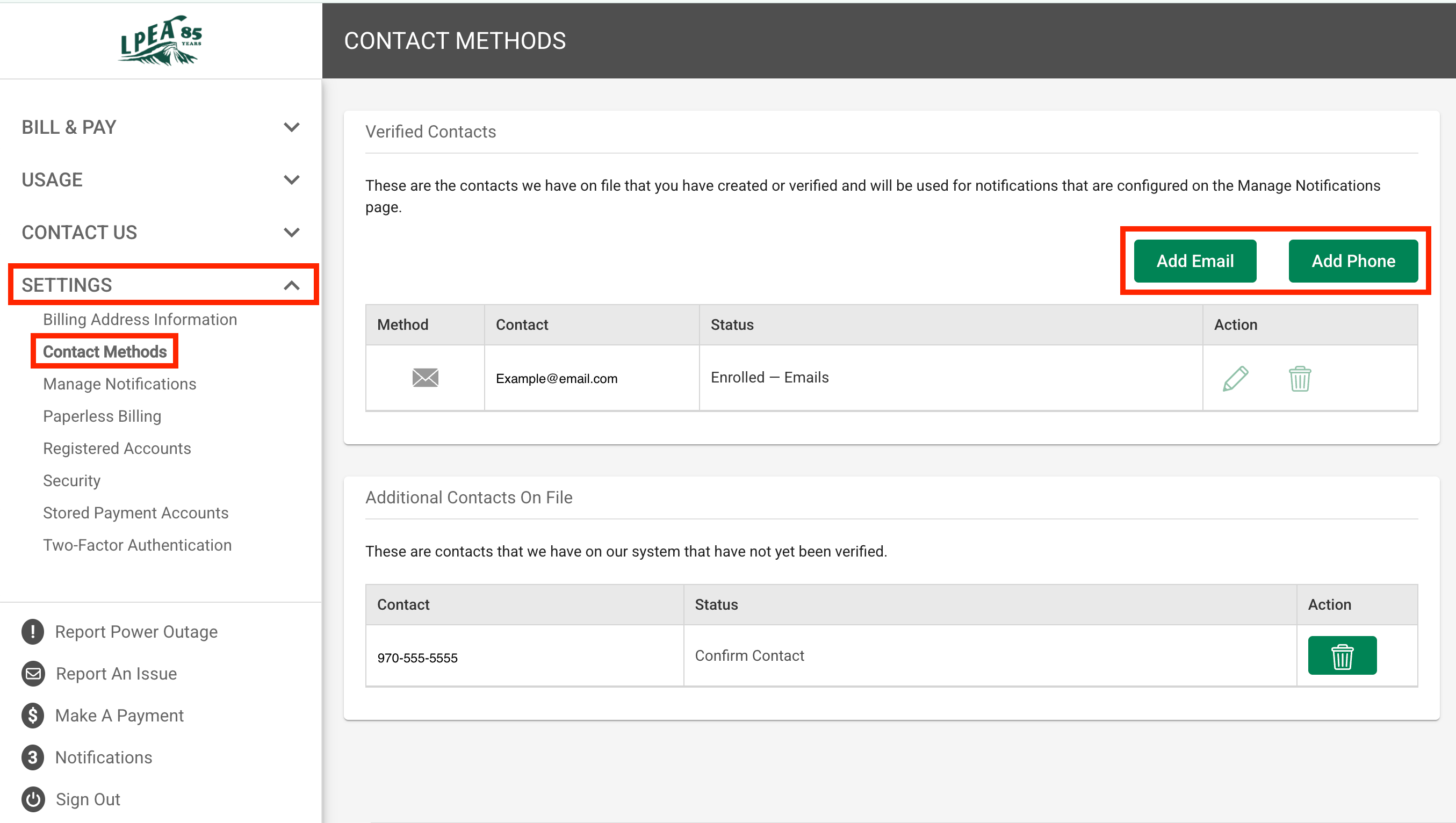
- Select Contact Methods
- Confirm the phone and/or email address where you'd like to receive notifications is listed. If not, you'll need to add it via the green buttons for Add Email or Add Phone
- Select Manage Notifications from the menu to the left
- Select Usage
- Select Peak Time Alert
- Ensure the contact methods you'd like to use are highlighted in grey and click Save in the bottom right.
- Here’s a step-by-step guide to activating LTL Event notifications.
- If you have trouble with this enrollment, please call 970-247-5786 and one of our Member Service Representatives can help you.
- Once you’ve enrolled in the program, you will receive an alert via email or text message informing you about an upcoming time when you can save. Alerts are typically sent a day in advance.
- These events will usually be two to three-hour blocks and are likely to occur between 6:00 AM and 10:00AM and between 4:00 PM and 9:00 PM.
- During the time period specified in the alert, reduce your electric usage however you’d like.
- The goal is to use less power during the peak event time window than you normally would.
Ways to Reduce Energy Usage in Winter:
- Turn off heat tape and roof cables: These run continuously and can draw 5 to 12 watts per foot. Turning them off for a 2-hour window during an event can be one of the single biggest reductions available to most members.
- Drop your hot tub temperature: Drop the setpoint by 10 degrees before the event window. The tub will coast through two hours and recover after.
- Delay your EV charging: Delay your charge session until after the event ends. Most EVs let you schedule charging through the vehicle or the charger itself.
- Turn off electric space heaters: If you're running a portable space heater, turn it off during the window and layer up.
- Wait to run laundry and dishwasher: Push these to after the event. A dryer alone pulls 2,000 to 5,000 watts.
Check out this resource for more ways to save energy.
Check out our rebate offerings for even more ways to save.
- We calculate a baseline from your electric usage during recent similar days.
- If you reduce your energy use during the specified timeframe compared to your baseline, you will get rewarded with a bill credit on your next bill: $1 per kWH reduced compared to your baseline.
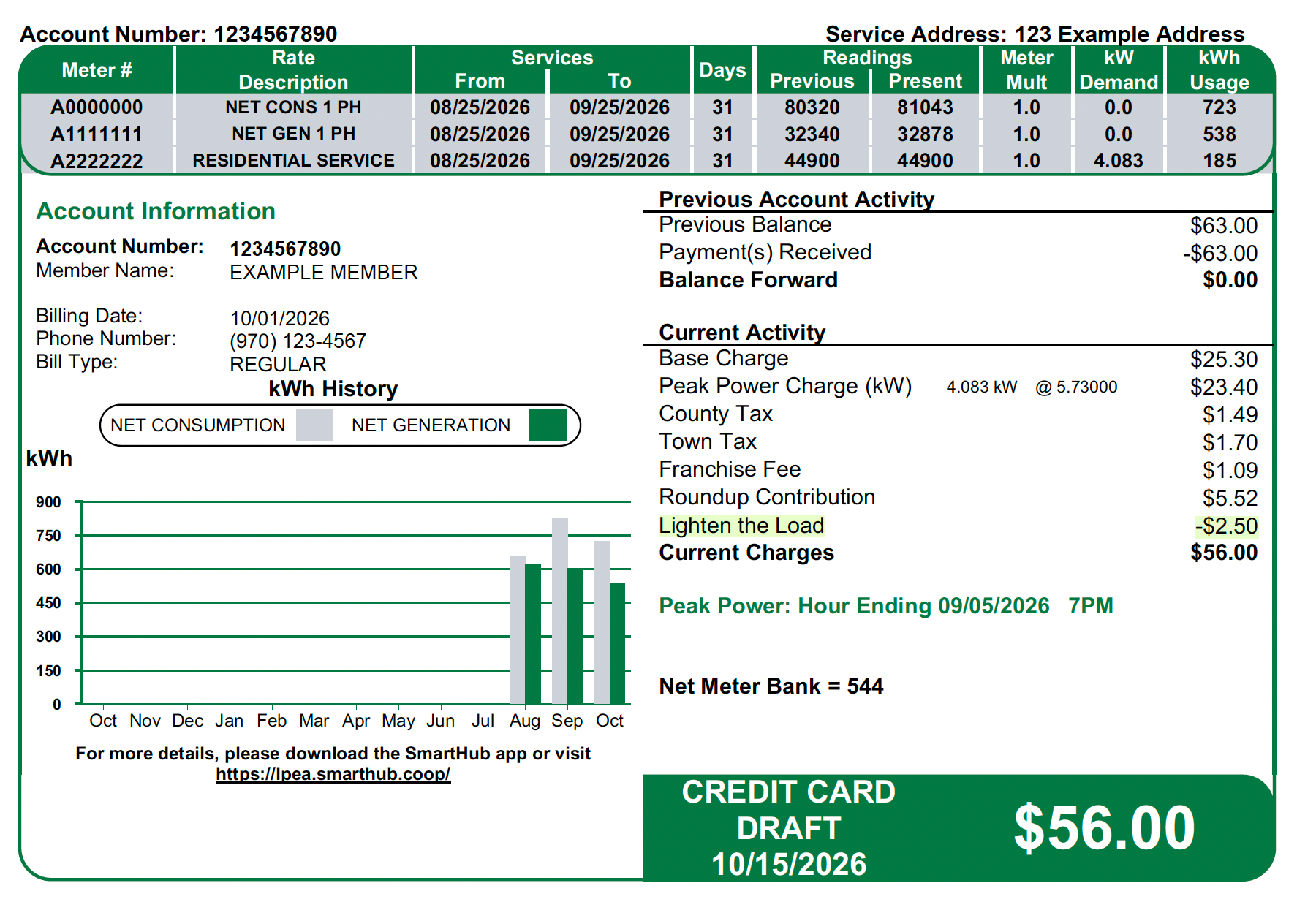
We're launching our Lighten the Load (LTL) program to increase awareness about peak power and the impact each member can have in helping decrease strain on our grid.
Our community uses the most collective power between 4 PM and 9 PM, which can cause long-term added stress to our system and result in the need to pull power from quick, less-clean energy resources.
What if we could make a shift and:
✔️Alleviate strain on the grid
✔️Reduce reliance on those quick, less clean energy resources
✔️Increase community-wide energy efficiency
✔️Earn bill credits for the energy you save
Lighten the Load rewards members for conserving electricity during specified periods when we forecast that the need for electricity will be higher than usual.
LPEA purchases wholesale power through the Southwest Power Pool. When demand spikes across our system, the cost of that power goes up, sometimes dramatically. Those costs get spread across all 35,000+ member accounts over time through rates.
Lighten the Load flips that equation. Instead of paying wholesale suppliers premium prices for peak power, we pay you to use less of it. Every kilowatt-hour our members collectively skip during a forecasted peak event is a kilowatt-hour we don't have to buy at the most expensive time of day. That keeps costs lower for everyone, and the members who participate earn bill credits for doing it.
If you're part of the Lighten the Load Program, we'll let you know when a Peak Event is coming, and you can help us keep usage down. PLUS! You'll save on your bill by reducing usage during those peak hours, AND we'll give you credit on your account for the energy you save.
Enrollment is voluntary, and there is no cost or risk to participate.
Sign up for Notifications from Desktop
- If you already have a SmartHub account you may skip this step
- You'll need the following information to set up your SmartHub account:
- Your billing account number
- Member's last name (or business name)
- A working email address
- Register HERE
- You may also access SmartHub via the green "PAY BILL" button at the top of the website or by downloading the APP

Once you are logged in to SmartHub, you'll be able to add your preferred contact methods
- Click the "Settings" tab (to the left side of the screen)
- Select "Contact Methods" from the "Settings" menu
- By default, the SmartHub registration email (you used to login) is added as an available contact. You may add additional emails and/or phone numbers to deliver LTL notifications to other people at your discretion.
If you don't wish to add a new email or phone contact (in addition to your registration email), proceed to Step 3.
- Select the contact method you'd like to add (phone or email)
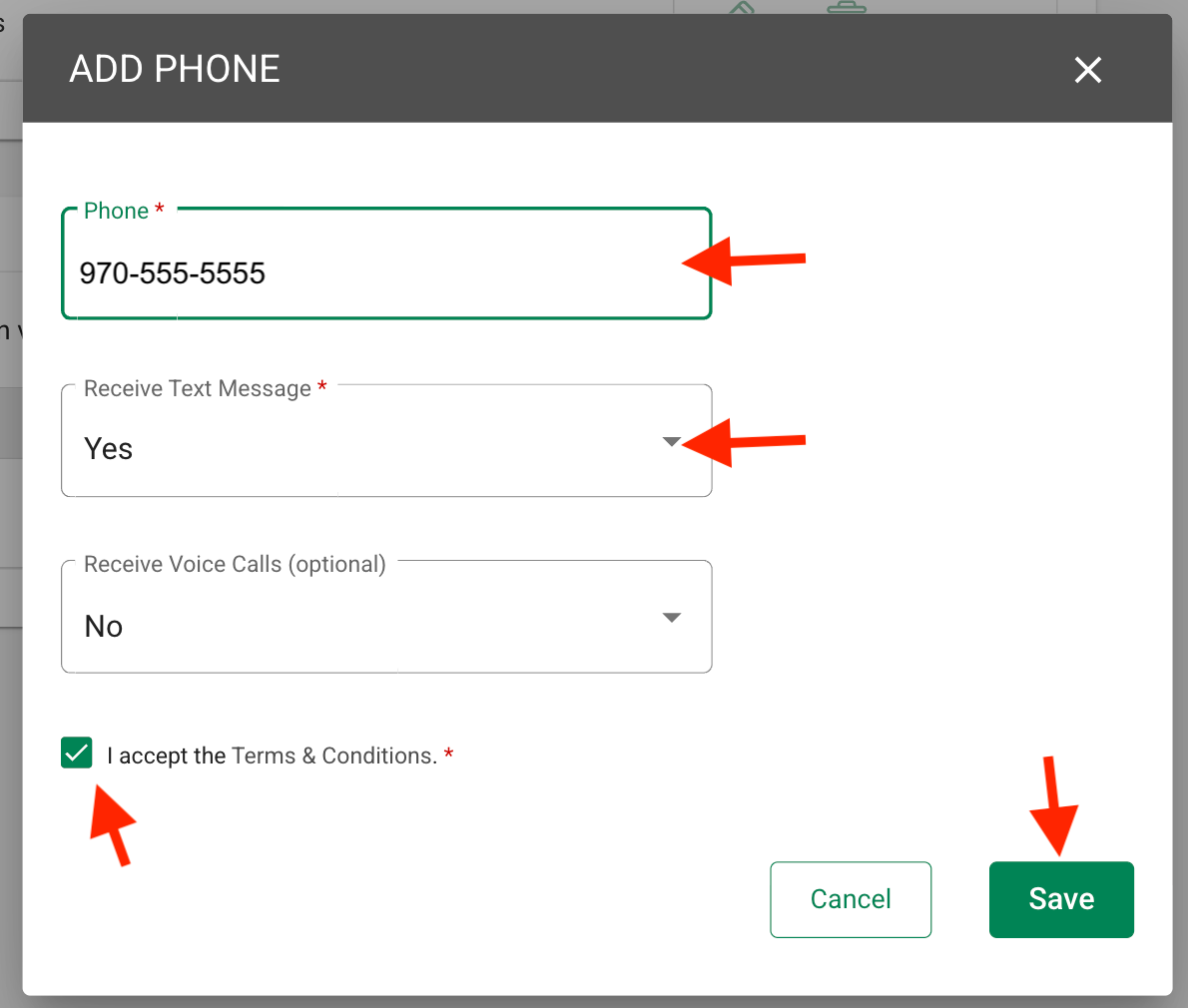
- If adding a phone number (Adding a new email address follows the same steps, without the text and voice call fields):
- Enter the phone number
- Select yes for text messages
- Select yes or no for voice calls (optional)
- Check the "I accept the Terms & Conditions" checkbox
- Click "Save"
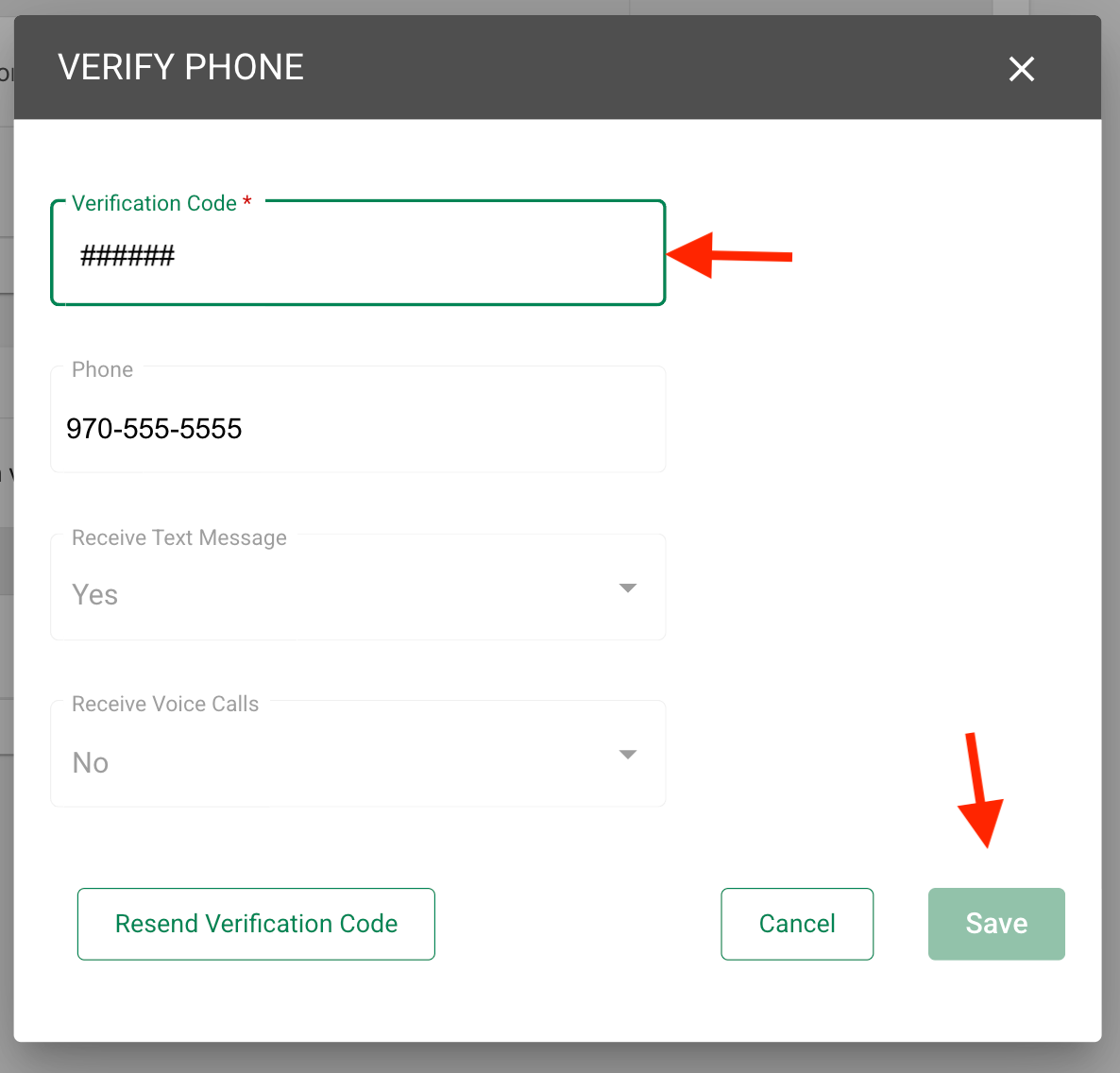
- A verification code will be sent to the number provided
- Enter the code into the verification code field when prompted
- Click "Save"
Once you've added your contact information, you may select the types of notifications you'd like to receive.
If you are enrolling in Lighten the Load, you MUST enroll your contact method (phone and/or email) in this notification type.
- Navigate to the "Settings" menu to the left of the screen
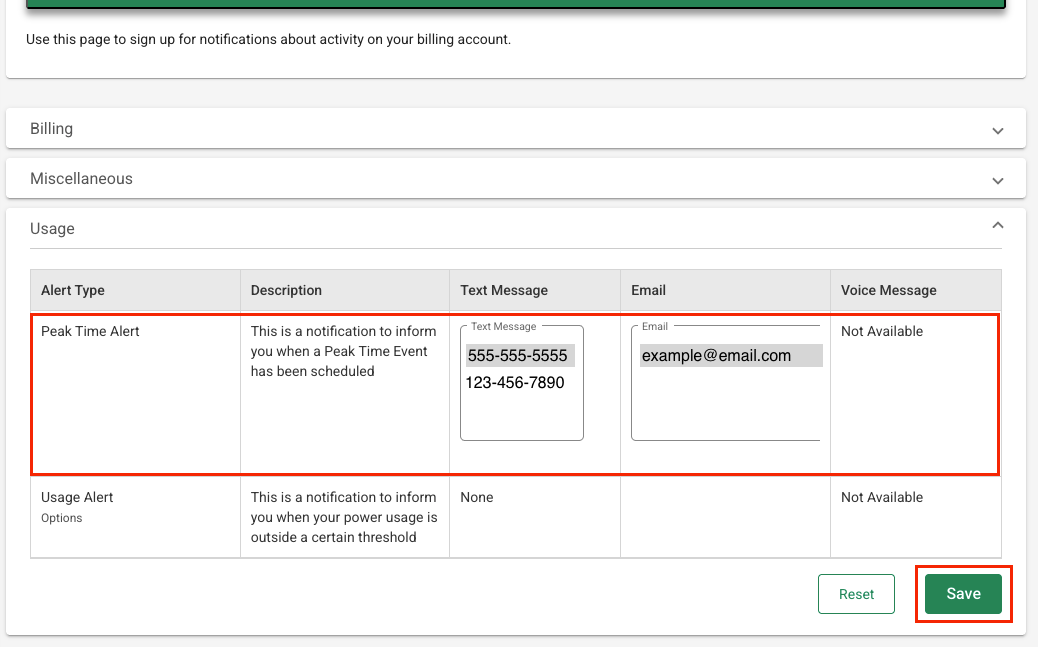
- Select "Manage Notifications"
- Select the "Usage" drop-down
- Confirm or add your phone and/or email address for the "Peak Time Alert" notifications. **Be sure the phone number and/or email address you want to use are highlighted in grey.
- Click "Save"
To take full advantage of the program and earn the biggest savings, remember to adjust things like thermostats and hot tub temperatures, reschedule things like laundry and dishwashing, and turn off things like heat tape.
Sign up for Notifications from Mobile
- If you already have a SmartHub account you may skip this step
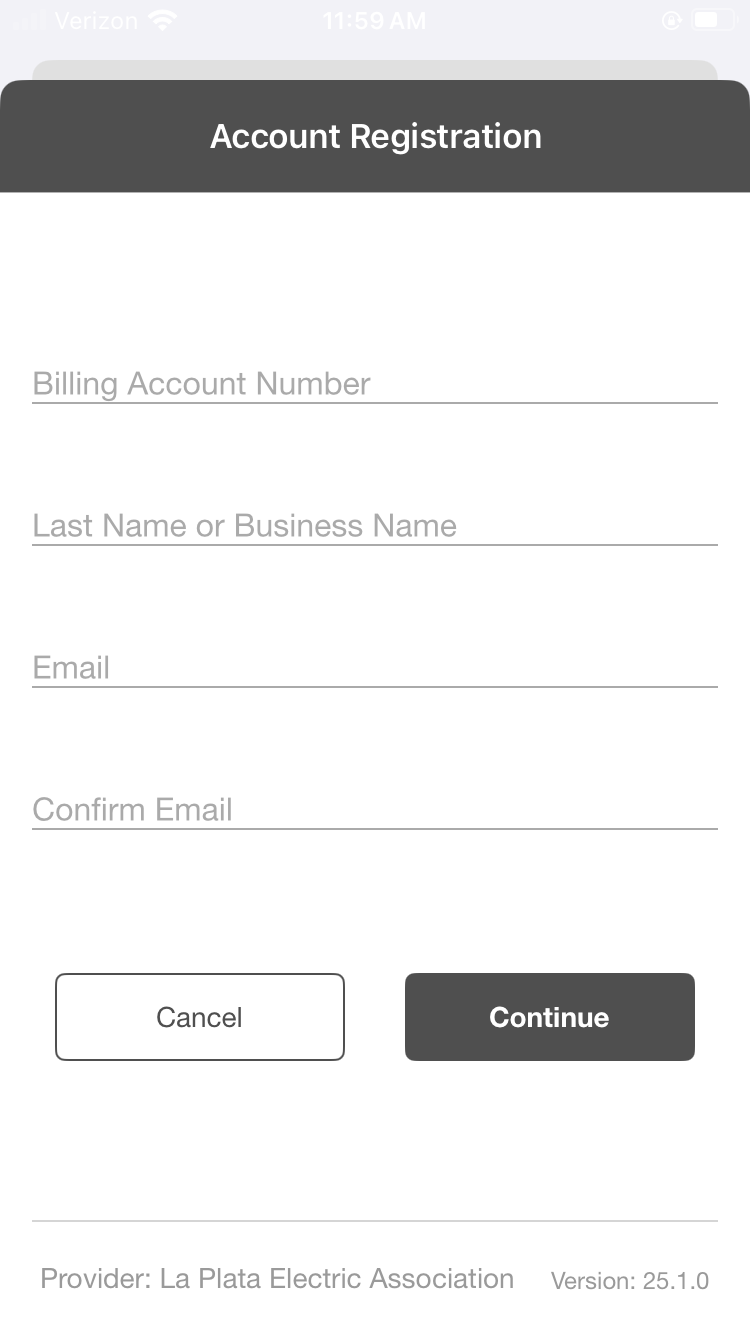
- You'll need the following information to set up your SmartHub account:
- Your billing account number
- Member's last name (or business name)
- A working email address
- Download the App HERE
- Select "Register Now" on the login screen then enter your information when prompted
Once you are logged in to SmartHub, you'll be able to add your preferred contact methods
- Click the three dots in the bottom right of the app to access the "Settings" menu
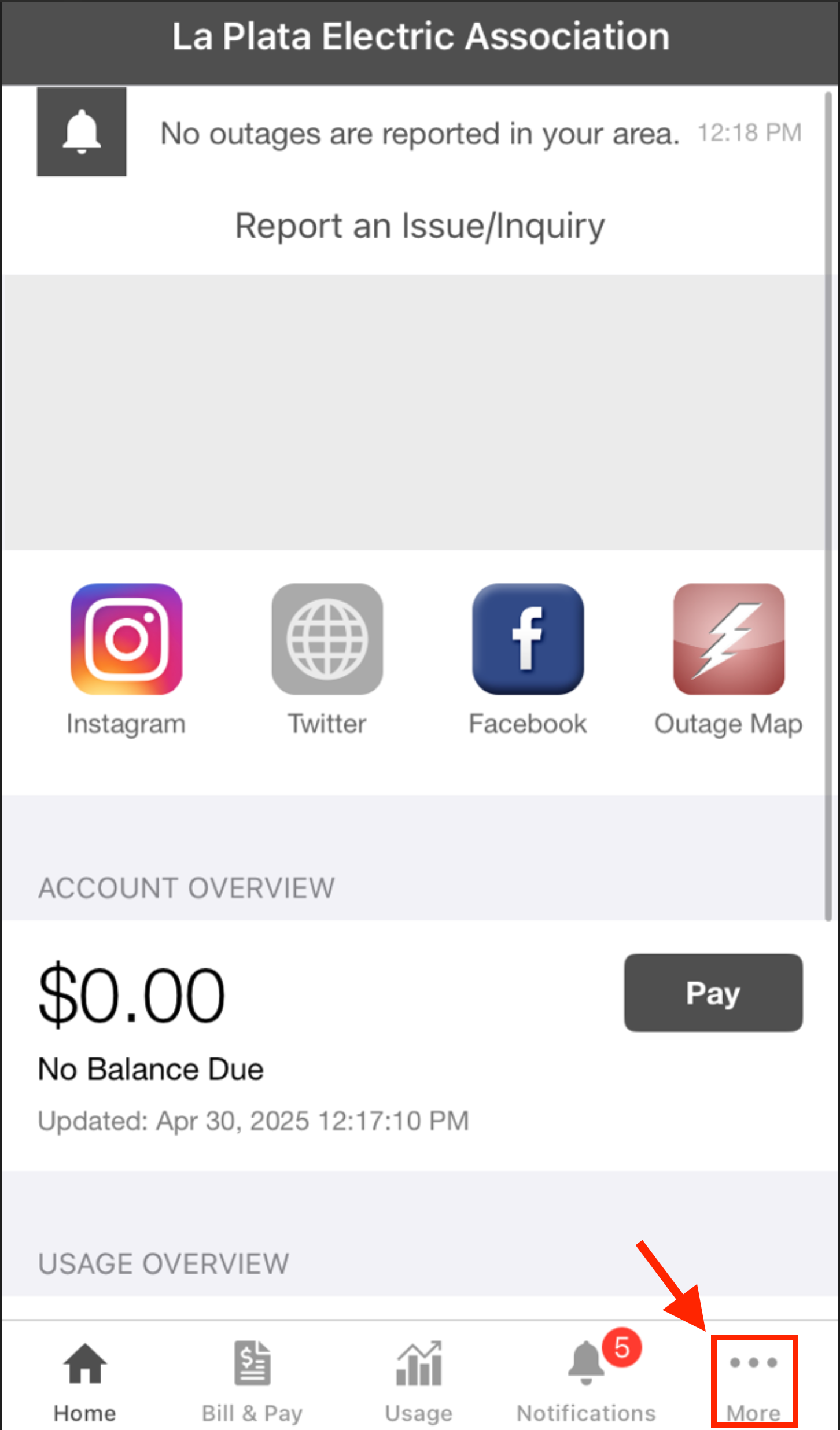
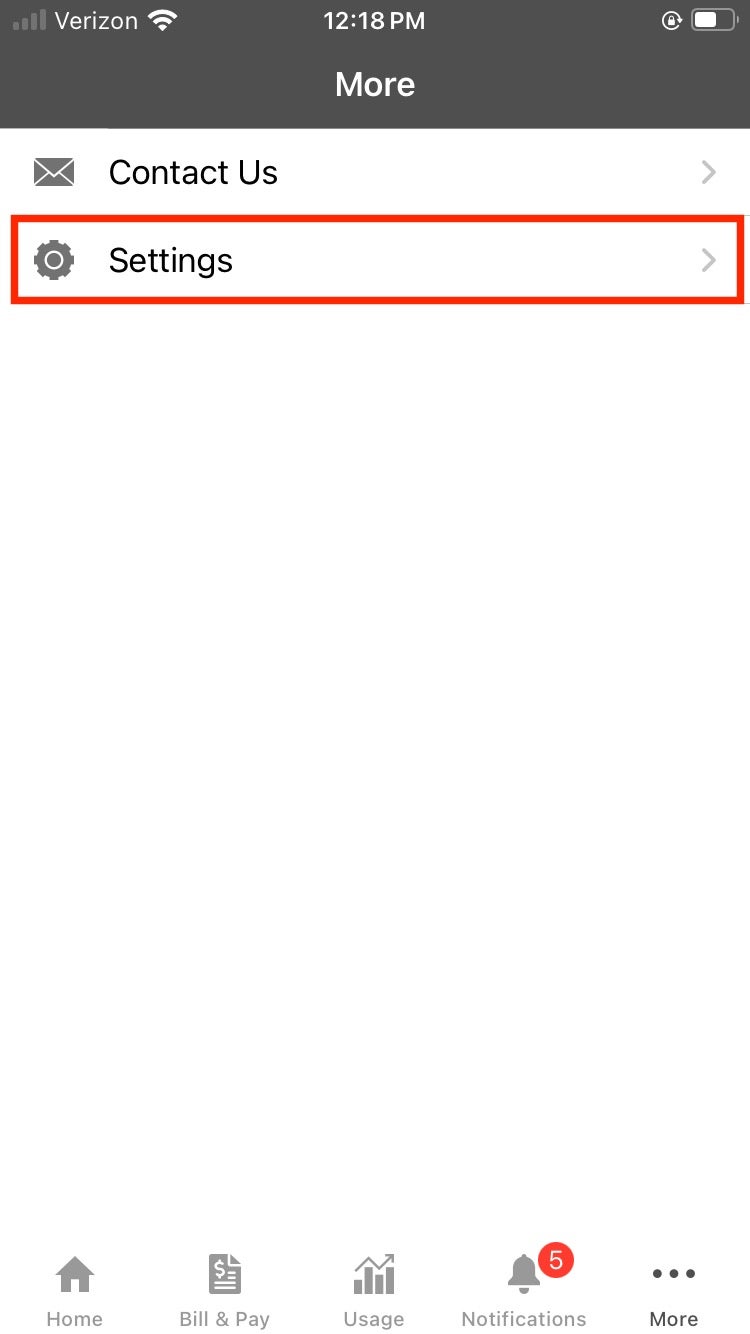
- Select "Contact Methods" from the "Settings" menu
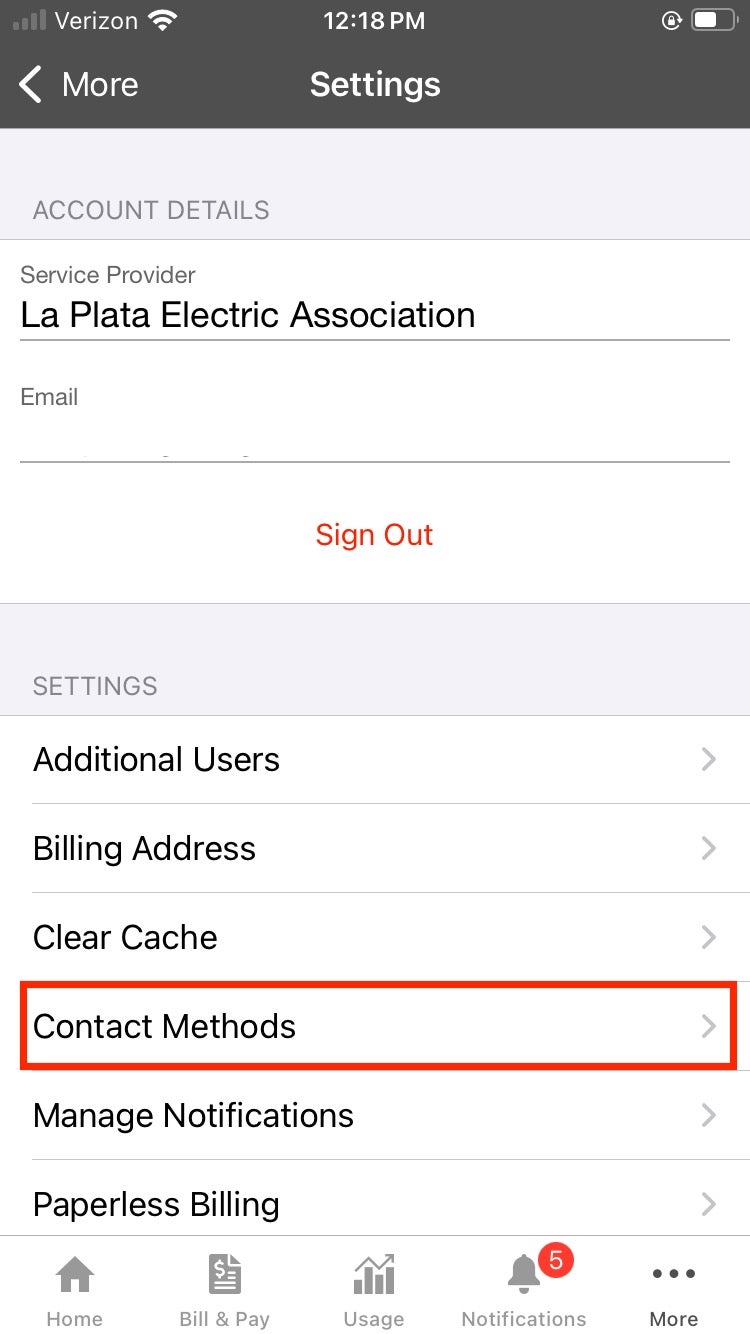
- By default, the SmartHub registration email (you used to login) is added as an available contact. You may add additional emails and/or phone numbers to deliver LTL notifications to other people at your discretion.
If you don't wish to add a new email or phone contact (in addition to your registration email), proceed to Step 3.
- Select the contact method you'd like to add (phone or email)
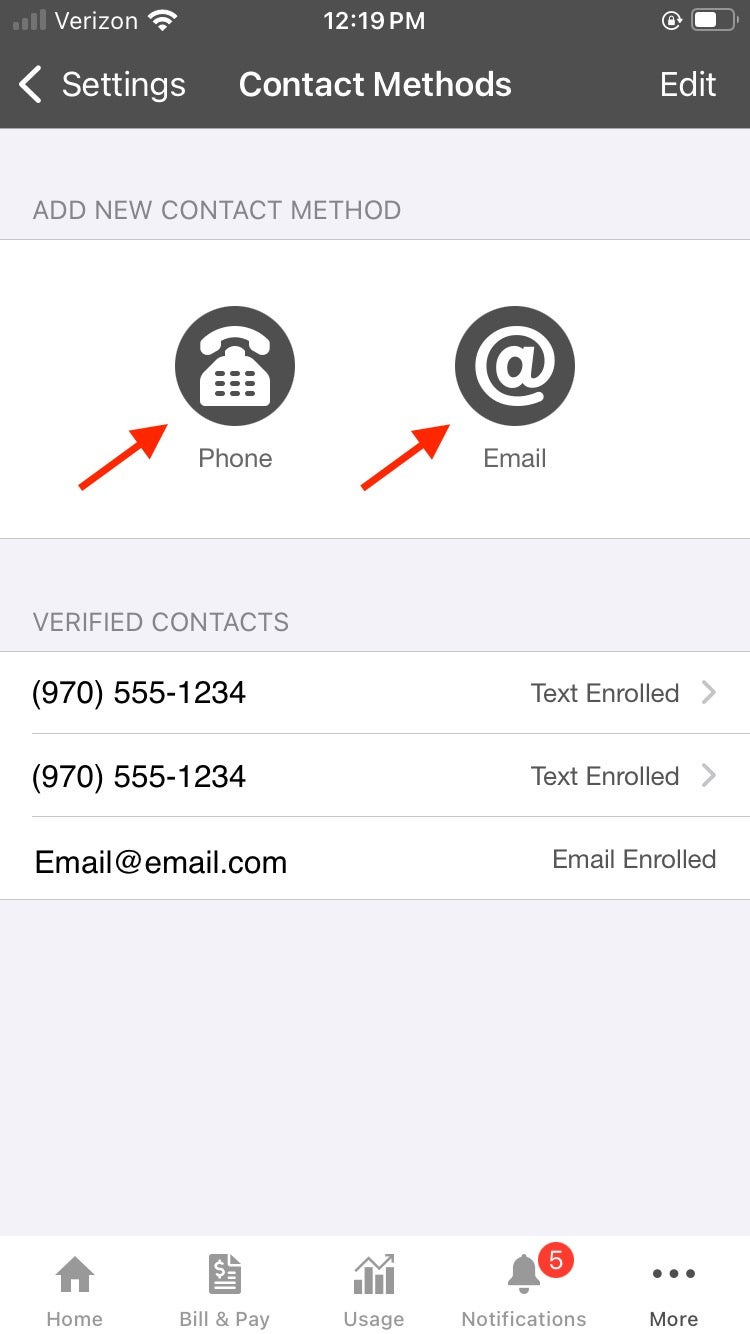
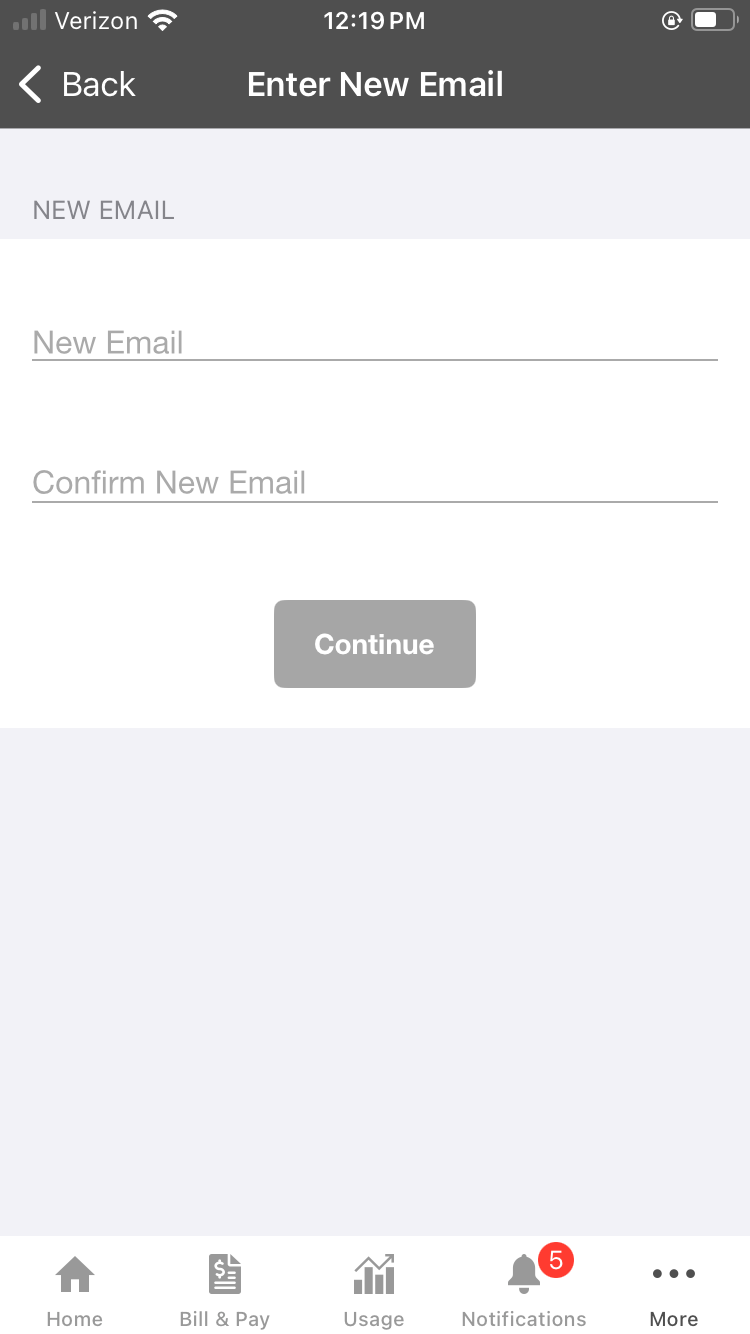
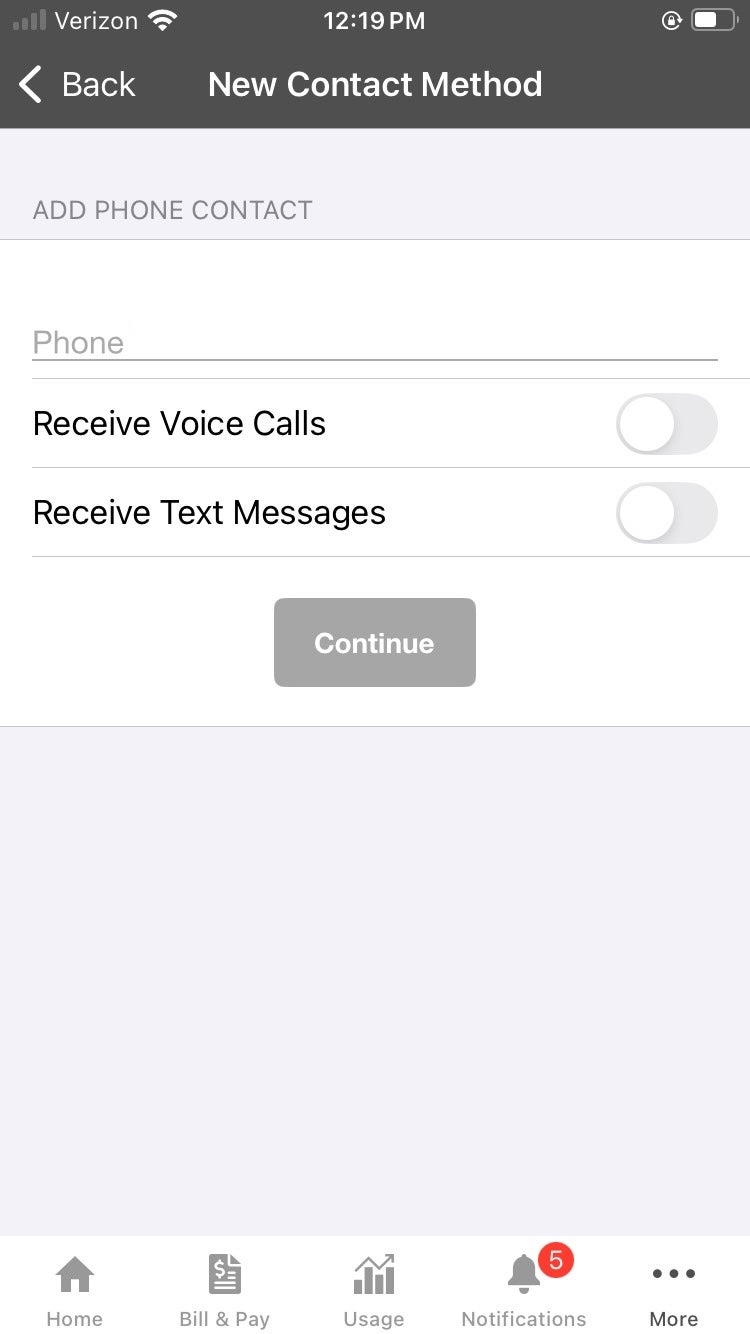
Once you've added your contact information, you may select the types of notifications you'd like to receive.
If you are enrolling in Lighten the Load you MUST enroll your preferred contact method (phone and/or email) in this notification type.
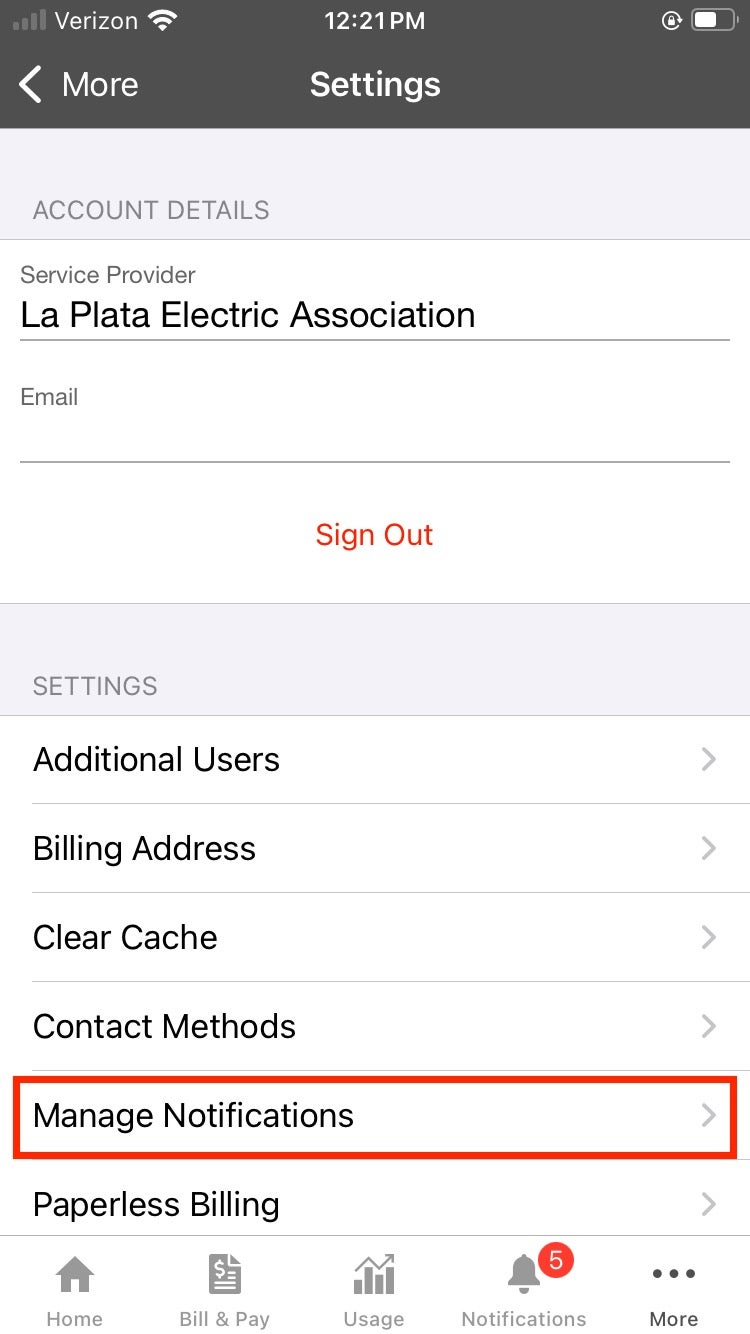
- Navigate to the "Settings" menu via the three dots to the bottom left of the app
- Select "Manage Notifications"
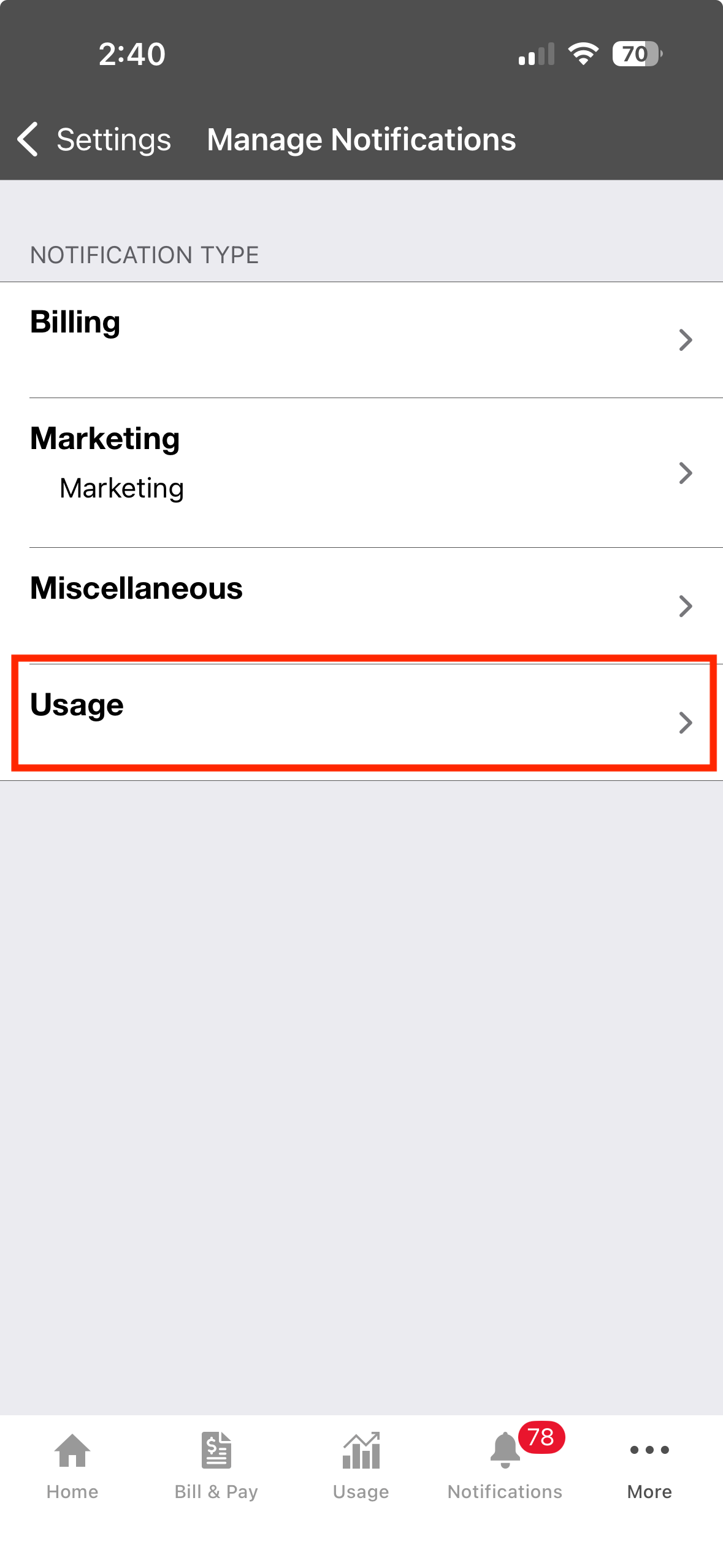
- Select the "Usage" Option
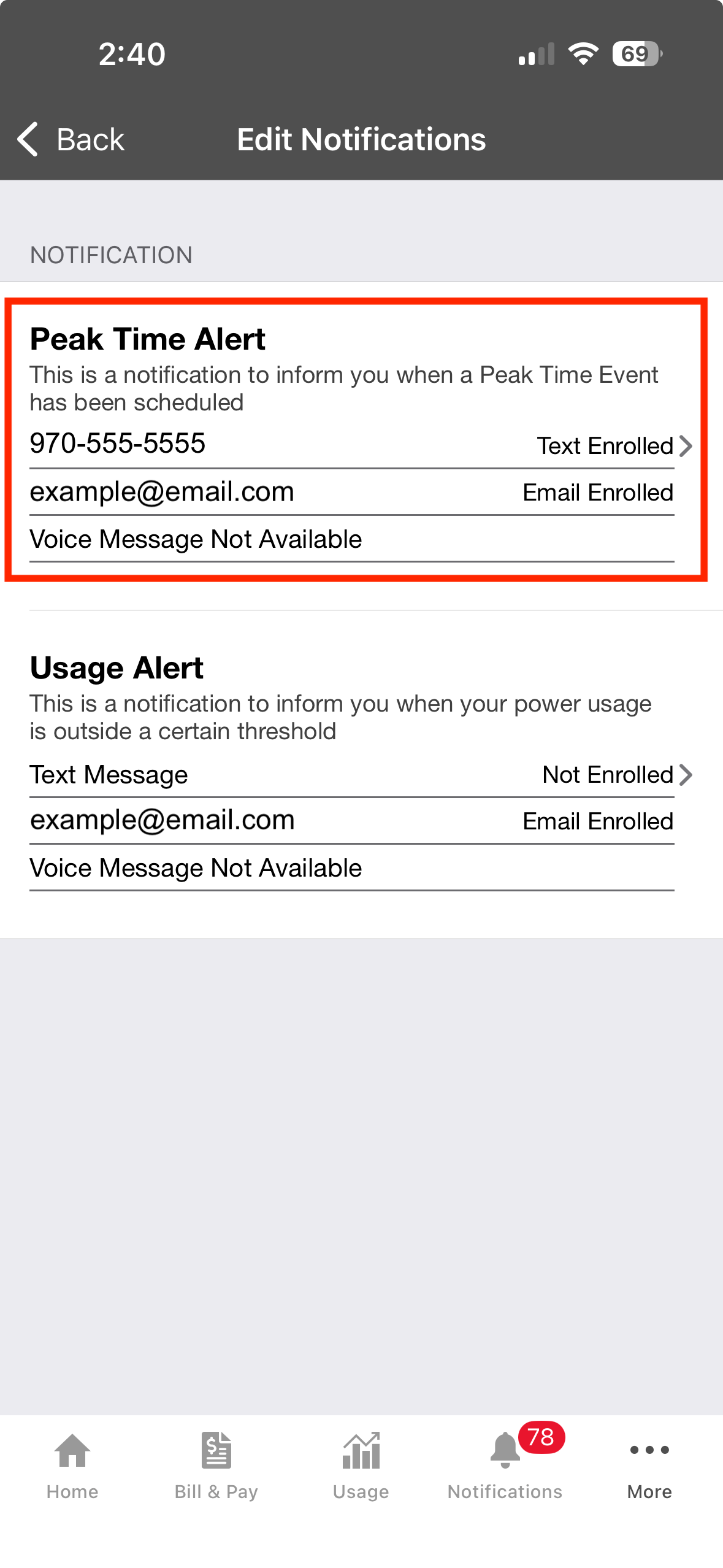
- Confirm that your phone number and/or email address is enrolled in the "Peak Time Alert" notifications.
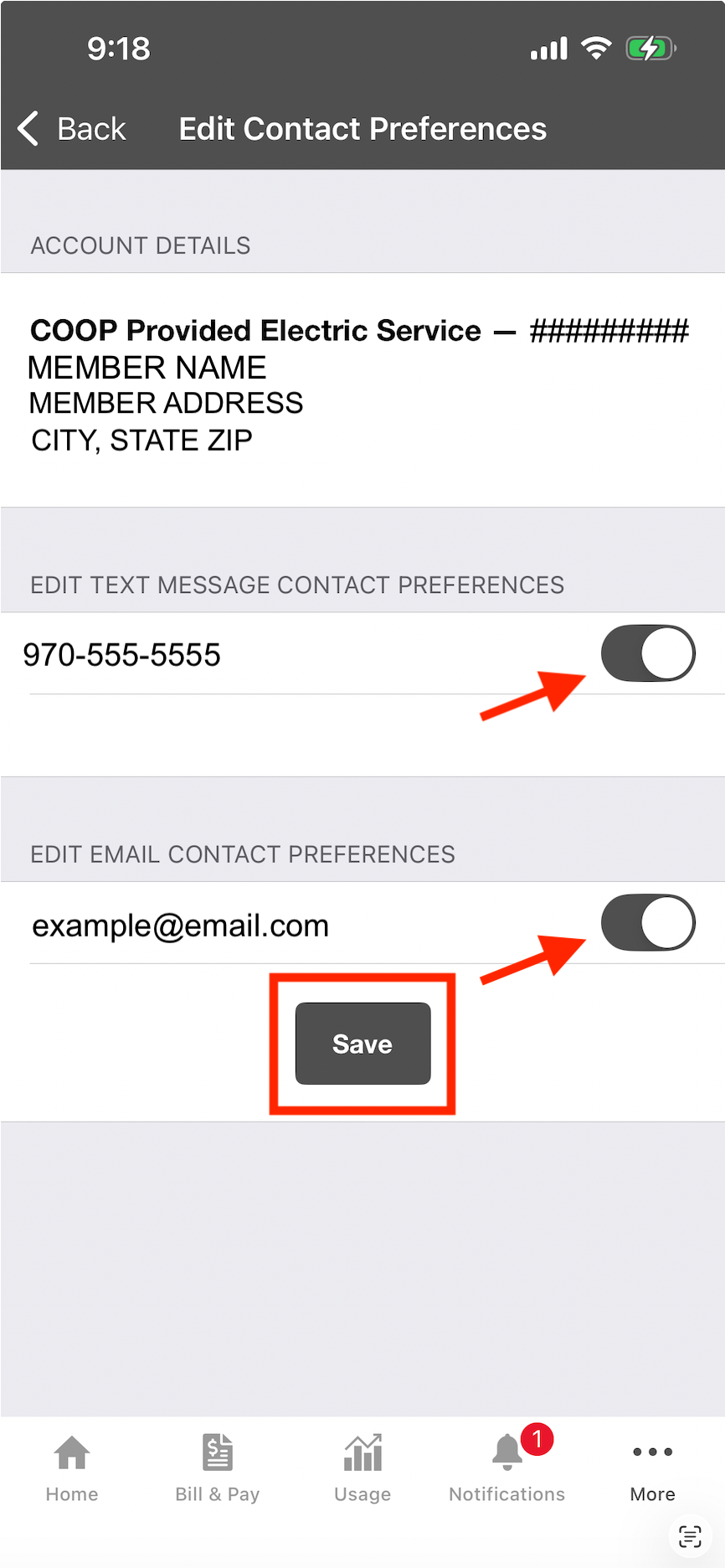
- If not, tap on "Not Enrolled"
- On the "Edit Contact Preferences" screen that opens, tap the toggle button next to the phone number and/or email address you would like to enroll.
- "Save"
To take full advantage of the program and earn the biggest savings, remember to adjust things like thermostats and hot tub temperatures, reschedule things like laundry and dishwashing, and turn off things like heat tape.
Terms and Conditions
Lighten the Load Program T&Cs
1. Program Overview
The Lighten the Load (LTL) program rewards participants for reducing their electricity usage during designated peak demand events. Participants can earn credits on their bill by lowering their energy usage below their predicted baseline(Section 4) during an announced LTL event. Through collective energy reduction during peak winter events, the entire membership will save money through reduced costs from our power providers.
2. Eligibility
To participate in the LTL program, you must:
- Be a current residential electric customer with either General Service rate 10, or Time of Use(15/16) with or without net metering
- Not have a legacy AMI meter opt-out
- Maintain an active email address or phone number for event notifications and accept notifications from LPEA
3. Lighten the Load (LTL) Events
3.1 Event Notification
- Participants will receive notification at least 12 hours before an event
- Notifications will be sent via email or text message or both based on member selection
- Events will typically occur on Monday-Saturday between 6-8AM and/or 5-7PM
- Events will not exceed 3 hours in duration
- There will be a maximum of 8 events per month
3.2 Event Participation
- Participation in LTL Events is voluntary
- There is no penalty for not reducing usage during events
4. Lighten the Load (LTL) Credit Calculation
For each LTL event, LPEA calculates a baseline: an estimate of how much electricity your home would normally have used during the event hours. Your bill credit is based on how far your actual usage during the event falls below this baseline.
4.1 Baseline Calculation
- Eligible days: LPEA looks back up to 30 days before the event and picks your most recent eligible days:
- Weekday events: up to the 10 most recent eligible weekdays, with at least 4 required
- Weekend events: the 4 most recent eligible weekend days, all 4 required
Weekday and weekend usage are calculated separately so that different routines on weekends don't skew the weekday baseline, and vice versa.
- Ineligible days: A day is not used if:
- A previous LTL event happened that day
- The meter is missing any readings during the event hours on that day
- Thanksgiving or Christmas were on that day, and your account is on the Time-of-Use rate
Missing readings outside the event hours don't disqualify a day.
- Usage is averaged in hourly intervals. Your meter records usage in intervals, typically hourly. LPEA averages each hourly interval separately across the eligible days. For example, for a 4:00–7:00 PM event, the baseline for 4:00–5:00 PM is the average of your 4:00–5:00 PM usage on the eligible days, and so on for each hour. If an event starts or ends partway through an interval, that whole interval is included. If your meter records 15-min or 5-min intervals, the usage will first be summed into hourly amounts and then averaged across the eligible days as described above.
- The baseline is compared with actual usage. For each hourly interval, LPEA compares the baseline with what your meter recorded during the event. The difference is your energy reduction for that interval.,
Insufficient data: If your account doesn't have enough eligible days within the 30-day lookback (at least 4 weekdays for a weekday event, or 4 weekend days for a weekend event), LPEA can't calculate a baseline, and you won’t be eligible for a credit for the event.
4.2 Credit Structure
- Participants will earn $1.00 per kilowatt-hour (kWh) reduced below their baseline during LTL Events
- Minimum reduction of 0.1% required to qualify for credit
- Maximum credit of $50 per event
5. Payment
- Credits will appear on your monthly utility bill as a “Lighten the Load” line item, and will typically appear with the next bill following the LTL event(s)
- Annual credit maximum of $100 per account
6. Program Changes and Termination
6.1 Customer Termination
- Participants may disenroll from the program at any time without any penalty
- Termination requests must be submitted in email: LTL@lpea.coop
- Participation will be canceled upon closing or deactivation of an account
6.2 LPEA Modifications or Termination
The utility reserves the right to:
- Modify program terms with 30 days' notice
- Adjust credit rates with 30 days' notice
- Cancel or suspend the program if required by regulatory bodies or operational necessity
7. Data Collection and Privacy
By participating in the program, you agree that the utility may:
- Collect and analyze your energy usage data
- Use aggregated and anonymized data for program evaluation and reporting
8. Disclaimers
- The utility makes no guarantee of savings or credit amounts
- Credits are subject to program funding availability
- The utility is not liable for any damages or costs related to voluntary load reduction efforts
- LPEA cannot investigate individual questions about credit determination
9. Contact Information
For questions or concerns about the LTL program:
- Email: LTL@lpea.coop
- Phone: 970-247-5786
- Website: https://lpea.coop/lighten-the-load
10. Agreement
Participation in the Lighten the Load (LTL) program constitutes acceptance of these terms and conditions.